MPEG to MP3 Converter
The main online MPEG to MP3 converter for .mpeg and .mpg files with no upload or signup.
Use the main MPEG to MP3 tool to convert MPEG or MPG files into downloadable MP3 audio directly in your browser.
Use it for quick audio extraction, repeat conversion jobs, or simple MP3 downloads when you want one clear workflow in one place.
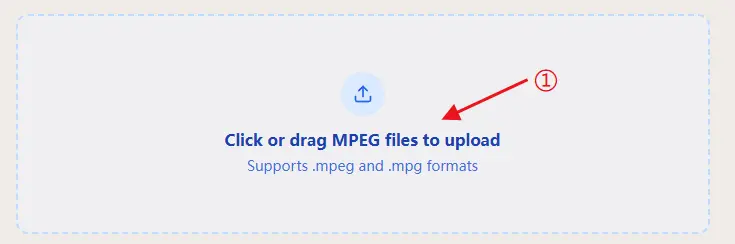
Click or drag MPEG files to upload
Supports .mpeg and .mpg formats
Input: .mpeg, .mpg
Output: .mp3 audio
Runs in your browser with no required upload flow.
First conversion may take longer while the FFmpeg engine loads.
First conversion note
The first conversion loads the FFmpeg engine and may take longer.
Large-file expectation
Files larger than 20 MB may take longer and use more browser memory.
Current queue status
Queue is idle. You can upload more files or download completed MP3 results.
Convert MPEG to MP3 Online
This is the main page for converting MPEG or MPG files to MP3 online with a browser-based workflow.
If you searched for mpeg to mp3, mpeg to mp3 converter, convert mpeg to mp3, or mpg to mp3, this page is designed to be the direct tool destination.
- Supports .mpeg and .mpg files
- Outputs downloadable .mp3 audio
Supported format workflow
How to Convert MPEG to MP3
- 1.
Select the MPEG or MPG files you want to convert to MP3.
- 2.
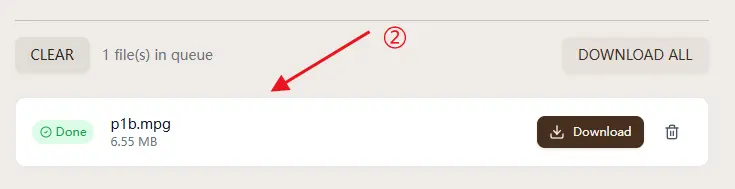
Start conversion in your browser and wait for the MP3 output to finish.
- 3.
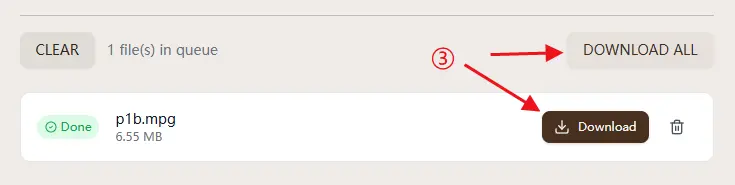
Download each MP3 file or use Download All as ZIP for batch conversion jobs.
MPG to MP3 Uses the Same Workflow
If your file is labeled .mpg instead of .mpeg, you can still use the same tool on this homepage. Most users search by the extension they see, so they may look for .mpg to mp3 or .mpeg to mp3 even though the practical job is the same: converting the source file into MP3 audio.
You do not need a separate converter page just because the file name shows .mpg. This tool is designed to support both .mpeg and .mpg inputs in the same browser-based workflow, so both .mpeg to mp3 and .mpg to mp3 queries can be handled here.
Why Use This MPEG to MP3 Converter
Matches the main search intent
Most users searching mpeg to mp3 want one clear action: convert a file to MP3 fast. This homepage keeps that action visible immediately, with the tool ready above the fold.
No upload workflow
A common reason to look for an online mpeg to mp3 converter is convenience without sending files away. This tool runs in the browser, so the workflow stays simple and local.
MP3 output is easier to use
MP3 is still one of the most compatible formats for playback, sharing, editing, messaging apps, and web uploads. That is why converting MPEG to MP3 is still useful.
Built for repeat tasks
If you need to convert multiple files, the queue and ZIP download flow is more practical than repeating a one-file conversion process over and over.
MPEG vs MP3 (Quick and Clear)
MPEG often refers to a broader family of compressed media standards. In practical web usage, users commonly encounter .mpeg or .mpg containers in older or mixed media workflows.
MP3 (MPEG Audio Layer III) is a compressed audio format with broad compatibility. Converting MPEG to MP3 is useful when you only need audio playback, sharing, or editing import.
Quality, Size, and Bitrate Guidance
- MP3 is usually chosen for compatibility first, then file size.
- For everyday playback and sharing, users typically want a practical balance between quality and download size.
- If your goal is speech, notes, or lightweight uploads, smaller MP3 files are often enough.
- If your goal is archive or music listening, compare outputs and keep the version that sounds right to you.
Who This MPEG to MP3 Tool Is For
This tool is for people who need a practical MPEG to MP3 converter, not a full media suite. It fits quick tasks like extracting audio, preparing uploads, or standardizing older source files.
If you convert MPEG to MP3 regularly, speed and repeatability matter more than extra settings. The page is designed to let you open, convert, and download without extra setup.
Searches vary, including mpeg file to mp3, convert mpg to mp3, and mpeg to mp3 converter free. In most cases the intent is the same: get usable MP3 output with fewer steps.
How This Differs from Typical Converter Pages
Many converter pages make users choose between too many formats before the core task is clear. This page keeps MPEG to MP3 as the primary action from the first screen.
Another common issue is weak trust language. Here the page states the main promise directly: browser-based processing, no required upload, and no account wall for basic use.
The layout also serves both first-time and repeat users. The tool is visible immediately, while supporting explanations and FAQ live lower on the page.
Privacy and Security
- Your source files are intended to stay on your device during conversion.
- Browser-side processing means the core MPEG to MP3 workflow does not depend on a mandatory upload step.
- No mandatory signup is required for the main conversion workflow.
- This is especially relevant for users searching for mpeg to mp3 without upload.
MPEG to MP3 FAQ
Is this MPEG to MP3 converter free to use?
Yes. The main MPEG to MP3 conversion workflow is available without payment.
How do I convert MPEG to MP3 on this page?
Upload an MPEG or MPG file, let the conversion finish in your browser, and then download the MP3 output or the ZIP batch.
Do I need to upload files to use this MPEG to MP3 converter?
No. The page is designed around browser-side conversion rather than a required upload flow.
Do I need to install software to convert MPEG to MP3?
No. You can run the conversion in the browser without installing a separate desktop app.
Can I convert MPG to MP3 with the same tool?
Yes. The same tool handles both .mpg to mp3 and .mpeg to mp3 workflows, accepting MPEG and MPG files and outputting MP3 audio.
Does this tool support MOV to MP3?
No. If you need that workflow, use mov to mp3.
Can I convert multiple MPEG files to MP3 at once?
Yes. You can queue multiple files and download the completed MP3 files individually or as a ZIP.